---
url: 'https://qronojs.dev/introduction.md'
---
# Introduction
Qrono is a **tiny** JavaScript date library with **100+ APIs** and **strict DST guarantees**.\
Designed for *single-timezone* applications.
```javascript
import { qrono } from 'qrono'
// UTC-first
const now = qrono().toString() // '2027-01-23T12:34:56:789Z'
// DST overlap (occurs twice) of Europe/London
qrono.context({ localtime: true })
const t = '2019-10-27T01:30:00'
qrono(t) // 01:30 +00:00 Same as JavaScript's `Date`
qrono({ disambiguation: 'earlier' }, t) // 01:30 +00:00
qrono({ disambiguation: 'later' }, t) // 01:30 +01:00
qrono({ disambiguation: 'reject' }, t) // throws RangeError
now.plus(0, 1, 10) // +1 month, +10 days
now.startOfMonth()
now.isBetween(qrono('2024-01-01'), qrono('2024-12-31'))
const date = qrono.date('2024-06-15')
date.dayOfYear() // 167
date.weekOfYear() // 24
date.endOfMonth() // 2024-06-30
```
## Getting Started
::: code-group
```sh [npm]
npm install qrono
```
```sh [bun]
bunx jsr add @urin/qrono
```
```sh [deno]
deno add jsr:@urin/qrono
```
```html [browser]
```
:::
### Usage
::: code-group
```javascript [npm]
// ES modules
import { qrono } from 'qrono'
// CommonJS
const { qrono } = require('qrono')
```
```typescript [bun / deno]
import { qrono } from '@urin/qrono'
```
```html [browser]
```
:::
## Design Philosophy
#### 🌍 **UTC-first by Default, Local by Choice**
* Keep storage and logic in UTC, and opt into local time only when needed.
* Locale formatting is delegated to the [ECMAScript Internationalization API](https://402.ecma-international.org/#overview).
#### 🕐 **DST is a First-Class Concept**
* Ambiguous times are not hidden; they are modeled explicitly.
* Dedicated APIs make overlap and gap behavior predictable.
#### 🔐 **Immutable by Construction**
* Every operation returns a new value, so chains are safe and reasoning stays simple.
* The API is shaped for common workflows instead of edge-case completeness.
#### ⚡ **Small Surface, Focused Power**
* Pure JavaScript with zero dependencies.
* A compact core with **100+** APIs through a tight, coherent design and a small compressed footprint.
#### ✅ **Standards-Aligned**
* Fully compliant with [ISO 8601](https://www.iso.org/obp/ui/#iso:std:iso:8601:-1:ed-1:v1:en) for interoperable date-time exchange.
#### 🔷 **TypeScript Included**
* First-class type definitions are part of the package.
* Works consistently across server-side and browser-side JavaScript.
### Why Qrono?
Other date-time libraries have larger codebases and more complicated usage to support multiple time zones and locales. Qrono takes a different approach:
* **[Moment.js](https://momentjs.com/)**\
Strength: very familiar in legacy codebases. Tradeoff: mutable objects and maintenance-mode status.
* **[Luxon](https://moment.github.io/luxon/)**\
Strength: rich feature set and timezone support. Tradeoff: ambiguous DST handling is not strict by default.
* **[Day.js](https://day.js.org/)**\
Strength: tiny core and Moment-like API. Tradeoff: key features depend on plugins.
* **[date-fns](https://date-fns.org/)**\
Strength: tree-shakable functional style. Tradeoff: inherits JavaScript `Date` quirks (mutability, 0-indexed months).
None of these libraries provide APIs to detect or handle DST transitions properly. Qrono fills this gap with a balanced approach - not too simple, not too complex, just right.
#### `Temporal` and `Intl`: Complementary, Not Competing
JavaScript already provides **`Intl`** for locale-aware formatting, and **`Temporal`** covers broader multi-timezone workflows. Qrono is deliberately narrower: it stays small by delegating localization to `Intl` and by focusing on applications that only need UTC plus the runtime's local time zone.
That makes the relationship complementary: use `Intl` for presentation, use `Temporal` when you need full time-zone modeling, and use Qrono when you want a lighter API for the common single-timezone case.
### Package Size Comparison
The table below compares browser-ready distribution files from npm as of April 4, 2026.\
Versions are pinned explicitly, and the compressed sizes are measured from each published minified browser build.
| Library | Version | Minified | gzip | brotli |
| --------- | :-----: | -------: | ------: | ---------: |
| *Qrono* | 1.5.0 | 11.6 kB | 3.7 kB | **3.3 kB** |
| Day.js | 1.11.19 | 7.0 kB | 3.0 kB | 2.7 kB |
| Luxon | 3.7.2 | 79.8 kB | 23.9 kB | 20.9 kB |
| Moment.js | 2.30.1 | 57.5 kB | 18.4 kB | 16.6 kB |
`date-fns` is intentionally excluded from this package-size table because it is designed for tree-shaking and is not meant to be evaluated as a single browser bundle.
### Repository Size Comparison
[](/comparison-repo-size.svg)
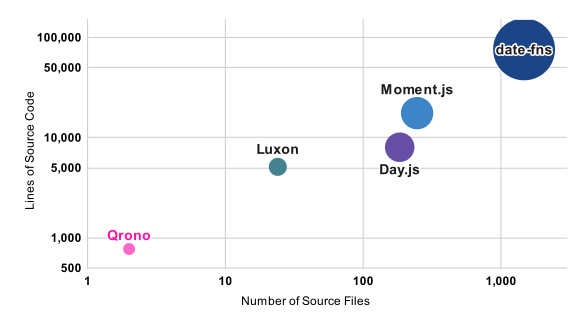
This comparison shows that **Qrono stands out for its small codebase** among other libraries. Its compact size reflects a strong focus on minimalism and efficiency, making it well suited for situations where bundle size and simplicity are important.
For many of the other libraries, their larger size is due to the fact that a significant portion of the codebase is dedicated to supporting a wide range of locales and time zones. Meanwhile, the larger size of `date-fns` is intentional and not a drawback. It is designed with tree-shaking in mind, so unused functions are removed at build time, and its API is intentionally fine-grained and verbose to provide clarity and flexibility. The size difference therefore represents a difference in design philosophy, not a measure of overall quality.
### Supporting Only the Local Time of the Execution Environment
When handling time in a globally accessible web application, careful consideration is required for local time.
#### Why Store in UTC
In general, the server does not know the user’s actual time zone or the time zone of the client environment (OS). If the system needs to be aware of the user’s time zone, an application-level mechanism to manage time zones becomes necessary.
For this reason, to keep the system design simple, the server should avoid managing user-specific time zones. Instead, the server should store and handle time exclusively in UTC. All time values should be transmitted to clients in UTC (typically as ISO 8601–formatted strings), and converting them into local time should be the responsibility of the client.
Qrono is designed precisely for this model. Because it is UTC-first while also supporting the local time zone of the runtime environment, it works naturally on both sides of this architecture: servers can stay simple with UTC-based logic, and clients can reliably handle local-time behavior.
Even when support for multiple locales is required, storing time data in UTC is usually sufficient. In most cases, locale-specific formatting can be handled entirely on the client side by using the [ECMAScript Internationalization API](https://402.ecma-international.org/#overview).
#### Why Use the OS Time Zone
In practice, the user’s time zone is usually assumed to be the same as the client environment’s (OS) time zone. For example, a user who resides in Japan may start using the application in the United States. If the user changes the OS time zone to match the local time in the United States, this will be done automatically in most cases, such as when the environment is a smart device; the client environment's time zone will differ from the one that is managed in the server.
Considering the large number of such edge cases, it is impractical for a server-side application to manage each user's intended time zone in a database-like manner.
#### Constraints and Exceptions
One important caveat of this design is that the time zone database of the client environment (OS) must be properly maintained. Daylight saving time rules — for example, in Brazil — may change from year to year, and time zone definitions themselves are determined by laws that are frequently revised. This means that the underlying time zone database must be kept up to date.
If the application is used in a closed or unmanaged environment where such updates cannot be applied due to special constraints, the approach described above may be insufficient.
In most typical environments, this requirement is satisfied automatically through the operating system’s regular update mechanisms, so it does not pose a practical issue for the majority of applications.
Considering these factors, **Qrono** is deliberately designed to forgo support for multiple time zones in order to achieve greater overall benefits, such as a **small code base and easy handling of daylight saving time transitions**.
### Handling Daylight Saving Time
Qrono is the only JavaScript date-time library with dedicated APIs for DST handling ([`hasOffsetChangeInYear()`](./api/#hasOffsetChangeInYear), [`isInDst()`](./api/#isindst), [`hasOffsetChangeInDay()`](./api/#hasOffsetChangeInDay), [`minutesInDay()`](./api/#minutesinday)).
JavaScript's `Date` object can behave in non-intuitive ways when handling daylight saving time transitions.
For example, see the following scenario in the Central Standard Time (CST) zone of the USA:
```javascript
const date = new Date('2021-03-14T03:00:00.000')
date.setMilliseconds(-1) // results 2021-03-14 03:59:59.999 CST
```
On March 14, 2021, daylight saving time begins. The time jumps directly from `2021-03-14 01:59:59 CST` to `2021-03-14 03:00:00 CST`.
In this example, subtracting 1 millisecond from `2021-03-14 03:00:00.000 CST` results in `2021-03-14 03:59:59.999 CST`. This appears to be a simple subtraction of 1 millisecond, but it actually advances the time by 1 hour.
This behavior is not a bug but a result of strictly following the [ECMAScript specification](https://262.ecma-international.org/11.0/#sec-local-time-zone-adjustment).
Additionally, a `Date` object created from a duplicated time during daylight saving time (DST) transition always refers to the time before DST ends. In other words, there is no simple way to obtain a `Date` object that refers to the UTC time **after** the end of DST from a duplicated time.
**Qrono** addresses these issues by providing a more principled approach to handling such transitions. Ambiguous local times — those that fall in a DST gap (spring-forward) or overlap (fall-back) — are resolved through the `disambiguation` option, which mirrors the [`Temporal` API](https://tc39.es/proposal-temporal/docs/):
```javascript
qrono.context({ localtime: true })
// Gap: 2019-03-31T01:30 does not exist in Europe/London
qrono('2019-03-31T01:30') // → 02:30+01:00 (compatible, DST side)
qrono({ disambiguation: 'earlier' }, '2019-03-31T01:30') // → 00:30+00:00 (standard side)
qrono({ disambiguation: 'reject' }, '2019-03-31T01:30') // throws RangeError
// Overlap: 2019-10-27T01:30 occurs twice in Europe/London
qrono('2019-10-27T01:30') // → 01:30+00:00 (compatible, standard side)
qrono({ disambiguation: 'later' }, '2019-10-27T01:30') // → 01:30+01:00 (standard side)
```
## Quick Tour
### Construction
```javascript
// now
qrono()
// from various types of arguments
qrono('2022-12-31') // => 2022-12-31T00:00:00.000Z
qrono(new Date())
// the following are the same 2022-12-31T15:23:11.321Z
qrono('2022-12-31 15:23:11.321')
qrono(1672500191321)
qrono(2022, 12, 31, 15, 23, 11, 321)
qrono([2022, 12, 31, 15, 23, 11, 321])
qrono({ year: 2022, month: 12, day: 31, hour: 15, minute: 23, second: 11, millisecond: 321 })
```
### Accessor
```javascript
const time = qrono(2022, 12, 31, 15, 23, 11, 321)
time.year() // => 2022
time.month() // => 12
time.day() // => 31
time.hour() // => 15
time.minute() // => 23
time.second() // => 11
time.millisecond() // => 321
time.second(0) // => returns new Qrono instance (immutable)
```
### Time Zone
```javascript
// UTC as default
qrono('2022-12-31 15:23:11.321').toString() // => "2022-12-31T15:23:11.321Z"
// set default to local time
qrono.context({ localtime: true })
qrono('2022-12-31 15:23:11.321').toString() // => "2022-12-31T15:23:11.321-04:00"
qrono('2022-12-31 15:23:11.321').context({ localtime: false }).hour() // => 11 as UTC
qrono('2022-12-31 15:23:11.321').hour() // => 15 as local time
```
### Conversion
```javascript
+qrono('2000-01-01') // => 946,684,800,000 milliseconds from UNIX epoch
const time = qrono('2000-01-02 03:04:05.006')
time.toObject() // => { year: 2000, month: 1, day: 2, hour: 3, minute: 4, second: 5, millisecond: 6 }
time.toArray() // => [2000, 1, 2, 3, 4, 5, 6]
time.nativeDate() // => JavaScript native Date instance
```
### Calculation and Comparison
```javascript
qrono('2000-01-01 01:00:00.000') - qrono('2000-01-01') // => 3,600,000 milliseconds = 1 hour
qrono('2000-01-01 01:00:00.000') < qrono('2000-01-01') // => false
qrono('2000-01-01').plus(7200000).minus(3600000) // => 2000-01-01T01:00:00.000Z
// In operations using Object, `year`, `month`, and `day` are calculated literally.
// For example, adding one month at the end of a month results in the end of the following month.
// `hour`, `minute`, `second`, and `millisecond` are treated as a duration in calculations.
qrono('2000-01-01').minus({ hour: 1, minute: 30 }) // => 1999-12-31T22:30:00.000Z
qrono('2020-02-29').plus({ year: 1 }) // => 2021-02-28T00:00:00.000Z
qrono('2021-12-31').minus({ month: 1 }) // => 2021-11-30T00:00:00.000Z
const today = qrono()
const yesterday = today.minus({ day: 1 })
const tomorrow = today.plus({ day: 1 })
today.isBetween(yesterday, tomorrow) // => true
```
### Short-hands
```javascript
const time = qrono('2000-01-02 03:04:05.006')
time.startOfYear() // => 2000-01-01T00:00:00.000Z
time.startOfMonth() // => 2000-01-01T00:00:00.000Z
time.startOfDay() // => 2000-01-02T00:00:00.000Z
time.startOfHour() // => 2000-01-02T03:00:00.000Z
time.startOfMinute() // => 2000-01-02T03:04:00.000Z
time.startOfSecond() // => 2000-01-02T03:04:05.000Z
time.dayOfWeek() // => 7 === qrono.sunday
time.dayOfYear() // => 2
time.isLeapYear() // => true
time.daysInMonth() // => 31
time.daysInYear() // => 366
// ISO week number. See https://en.wikipedia.org/wiki/ISO_week_date
time.weeksInYear() // => 52
time.weekOfYear() // => 52
time.yearOfWeek() // => 1999
// Daylight saving time stuff that is meaningful in case of local time
const localtime = time.context({ localtime: true })
localtime.hasOffsetChangeInYear()
localtime.isInDst()
localtime.hasOffsetChangeInDay()
localtime.minutesInDay()
```
### QronoDate
`qrono.date(...)` returns a `QronoDate` instance with only date information.
Methods of `QronoDate` are almost compatible with those of `Qrono`.
```javascript
qrono.date('2000-01-02').toString() // => "2000-01-02"
qrono('2000-01-02 23:04:05.006').toDate() // => QronoDate instance 2000-01-02
+qrono.date('2000-01-02') // => 10958 days from UNIX epoch
```